
ChatGPT and Gemini Prompts for Students: Summaries and Exam Prep
Copy-paste prompts for ChatGPT and Gemini: summaries you can actually study from, instant mind maps, and mock exams with explained feedback.
It’s 11 p.m., the exam is tomorrow, and you have 40 pages of notes you haven’t touched. You open ChatGPT, paste everything in, and type: “summarize this”.
You get a tidy summary and read it twice. It all makes sense, but the next morning, staring at the test, your mind goes blank. Reading the summary gave you the feeling of knowing, not the knowledge itself.
The AI isn’t the problem. You used it as a photocopier instead of a tutor. This guide gives you ChatGPT and Gemini prompts built for real studying: summaries that are actually useful, mind maps in seconds, and mock exams that get you ready for the real thing.
Why Aren’t Your Study Prompts Working?
Asking the AI for a summary and rereading it is passive studying. It feels productive because the text is clear, but your brain barely breaks a sweat.
What works is retrieval practice: forcing yourself to pull information out of memory without looking. That’s why the best study prompts don’t ask the AI to think for you. They ask it to make you think.
Backed by research: In a 2006 study published in Psychological Science, Henry Roediger and Jeffrey Karpicke found that students who tested themselves remembered considerably more a week later than those who simply reread the same text. It’s known as the testing effect.
OpenAI and Google both took notice. In 2025 ChatGPT launched study mode, which guides you with questions instead of handing over the answer, and Gemini followed with Guided Learning. The prompts in this guide work with or without those modes turned on.
The Five-Part Formula: Role, Context, Task, Format, and Limits
A vague prompt gets a vague answer. A good study prompt has five parts, and each one prevents a common mistake:
| Part | What you tell the AI | What it prevents |
|---|---|---|
| Role | “Act as a high school chemistry teacher” | Explanations that are too technical or too basic |
| Context | Your level, the subject, and when the exam is | Generic answers that don’t fit your course |
| Task | One concrete action: summarize, quiz, compare | The AI trying to do a bit of everything |
| Format | List, table, cards, number of points | Walls of text you can’t review |
| Limits | “Use only my notes,” “don’t give me the answer” | Made-up facts and free answers |
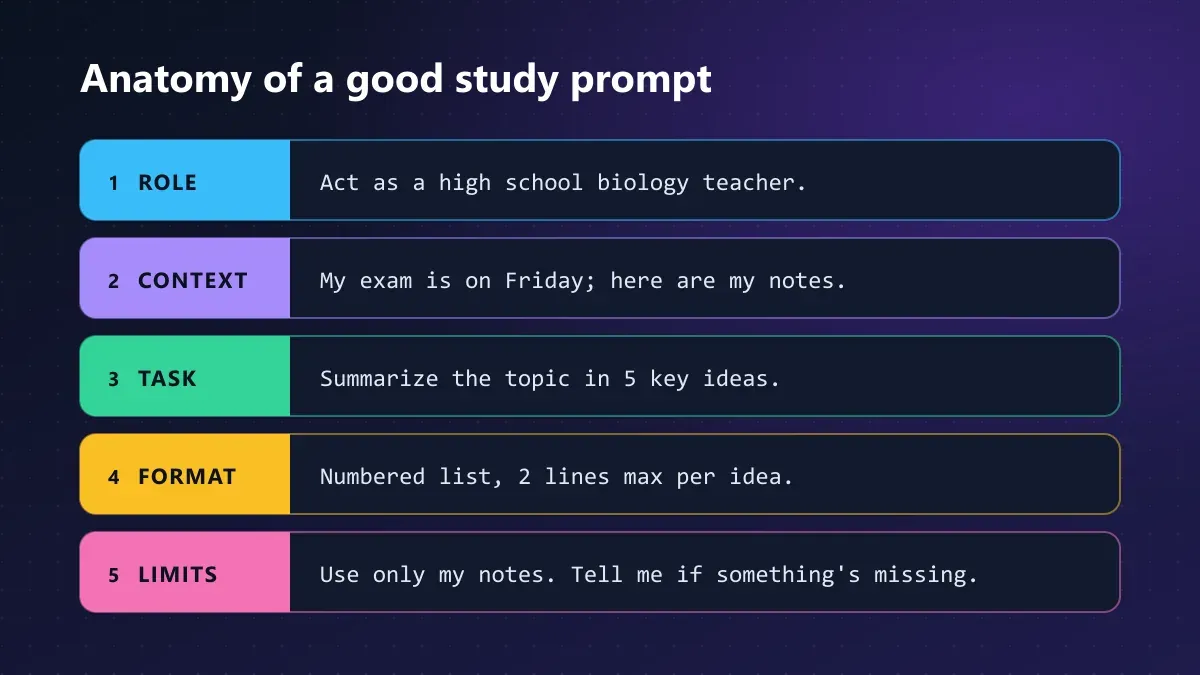
You won’t always need all five. But when a result falls flat, the missing piece is almost always context or limits.
Summary Prompts That Actually Help You Study
A good summary isn’t just a shorter version of the text. It’s a version organized for review. These three prompts tackle the same material from different angles.
Layered Summary: From the Big Idea to the Details
Perfect for your first pass through a topic. It makes you see the forest before the trees.
Act as a [SUBJECT] teacher for [LEVEL: high school / college].
Here are my notes on [TOPIC]. Write a three-layer summary:

1. One sentence with the central idea of the topic.
2. The 5 key ideas, each in 2 lines max.
3. For each key idea, a concrete example or fact that supports it.

Use only the information in my notes. If something important seems to
be missing for understanding the topic, flag it in a separate list at the end.

[PASTE YOUR NOTES HERE]
That last instruction is the most valuable one. If your history notes are missing, say, the date of a key treaty, the AI can point it out before you discover the gap on exam day. That warning is worth more than the whole summary.
Cornell-Style Summary with Cue Questions
The Cornell method splits the page into notes, cue questions, and a final summary. You can have the AI recreate it:
Convert my notes on [TOPIC] into the Cornell format:
- Left column: short questions that each block of notes answers.
- Right column: the answer summarized in 1-2 lines.
- At the end: a 3-line summary of the most important points.

Present it as a table. Don't add information that isn't in my notes.
The trick is to review it later with the right column covered. That turns the summary into a self-quiz.
Explain It Like I’m 12: The Feynman Technique
When a concept just won’t click, ask for an explanation aimed at a total beginner, then flip the roles:
Explain [CONCEPT] as if I were 12 years old, using an everyday analogy.
Then ask me to explain it back in my own words, and point out which
parts of my explanation are wrong or incomplete.
Tip: Always paste your own material (notes, course PDFs, your teacher’s slides). When the AI relies only on what it “knows,” it can blend in approaches from other curricula or invent details with complete confidence.
How to Create Mind Maps with ChatGPT and Gemini
Mind maps work because they show relationships, not just isolated facts. AI can generate them in three ways, from simplest to most visual.
Text Outline Mind Map
Great for copying by hand into your notebook, which is exactly when the learning happens:
Create a mind map about [TOPIC] as a hierarchical outline:
- One central node.
- 4 to 6 main branches.
- Up to 3 sub-ideas per branch, 2 to 5 words each.
Use an arrow (→) to mark important connections between different branches.
Visual Mind Map with Mermaid Code
This is the trick few students know about. Both ChatGPT and Gemini can write Mermaid code, a language that turns plain text into diagrams. Use this prompt:
Generate a mind map about [TOPIC] using Mermaid "mindmap" syntax.
Max 3 levels deep and no more than 4 words per node.
Return only the code block.
You’ll get something like this:
mindmap
  root((Photosynthesis))
    Light reactions
      Thylakoids
      Makes ATP and NADPH
      Releases oxygen
    Calvin cycle
      Stroma
      Fixes CO2
      Makes glucose
    Factors
      Light
      Temperature
      Water
Copy the code, paste it into the free Mermaid Live editor, and the map renders instantly. You can export it as PNG or SVG from there. Don’t like a branch? Ask for the change in the chat and paste it again.
Automatic Mind Maps with NotebookLM
If you live in Google’s ecosystem, NotebookLM builds interactive mind maps from the documents you upload. You can click any node to ask about that specific subtopic, although the feature isn’t available in its mobile app.
Want something flashier to share with your study group? The method in our guide to infographics with ChatGPT can turn that same map into an editorial-quality infographic.
Exam Prep Prompts: From Mock Test to Feedback
This is where AI really earns its keep. It’s no longer about condensing information. It’s about testing yourself before your teacher does.
Mock Exam with Explained Feedback
Act as my [SUBJECT] teacher. Using the material I give you, create a
10-question mock exam:
- 4 multiple choice, 3 true/false with justification, and 3 open-ended.
- Ask me the questions ONE AT A TIME and wait for my answer before moving on.
- After each answer, tell me whether it's correct, why, and which part
  of the material to review if I got it wrong.
- At the end, give me a score out of 10 and my 3 weakest areas.

[PASTE THE MATERIAL HERE]
The “one at a time” instruction is essential. Leave it out and the AI dumps all 10 questions with their answers, which defeats the whole point.
Flashcards for Spaced Repetition
Create 20 flashcards on [TOPIC] based on my notes.
Format: a two-column table, "Question" and "Answer".
Answers should be 15 words max.
Mix definition, cause-and-effect, and practical application questions.
Asking for a table lets you paste the cards into Anki, Quizlet, or even Wordwall to turn them into a game. Review them today, in three days, and in a week: that spacing is what locks them into long-term memory.
Socratic Tutor: Let the AI Quiz You
When you understand a topic “kind of,” this prompt reveals exactly where the gaps are:
I want to check whether I truly understand [TOPIC]. Don't explain anything yet.
Ask me questions of increasing difficulty, one at a time. If I get one wrong,
give me a hint instead of the answer. Only explain the concept if I miss
twice in a row.
That’s essentially what ChatGPT’s study mode and Gemini’s Guided Learning do, except here you set the rules.
Study Plan Up to Exam Day
My [SUBJECT] exam is on [DATE]. The topics are: [LIST].
I can study [X] hours a day. My weakest topics are: [LIST].
Build a day-by-day plan that includes spaced reviews, at least
two mock exams, and a rest day before the exam.
Present it as a table.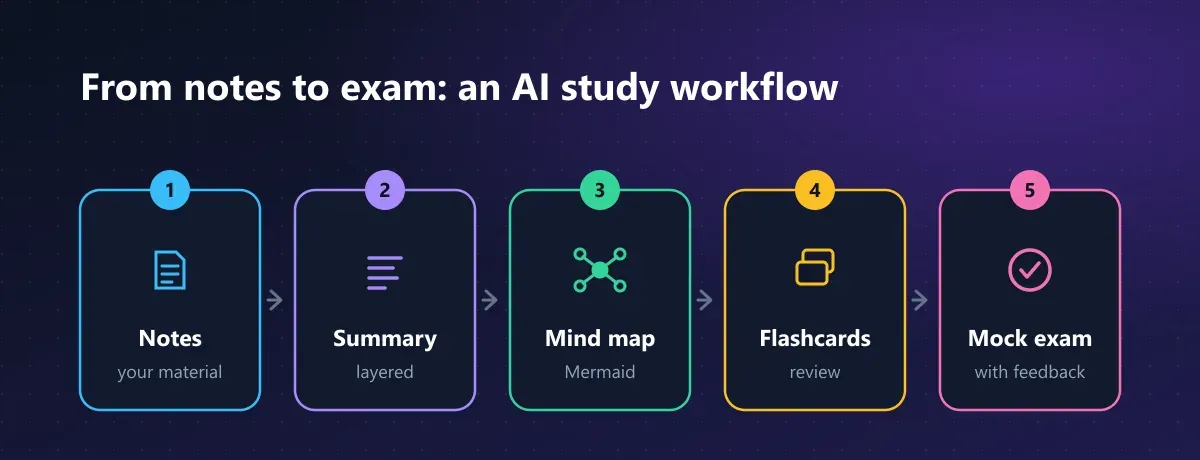
That’s the full journey: from raw notes to a graded mock exam, with each prompt in this guide covering one step.
ChatGPT vs Gemini: Which One Fits Each Study Task?
Every prompt above works in both assistants. Still, each one has strengths depending on the task:
| Task | ChatGPT | Gemini |
|---|---|---|
| Built-in tutor mode | Study mode (Socratic questions and hints) | Guided Learning (with images and YouTube videos) |
| Working with your files | Upload PDFs, photos of notes, and documents | Upload files and connect to Google Drive |
| Flashcards and quizzes | Through prompts, in chat format | Interactive study tools on top of chat |
| Mind maps | Mermaid code or text outlines | Mermaid code, or interactive maps via NotebookLM |
| Classroom integration | Standalone | Integrates with Google Classroom |
Our take: if your school runs on Google Workspace, Gemini and NotebookLM save you steps. If you want a conversational tutor to work through problems, ChatGPT’s study mode is excellent. Free plans change often, so check each one’s current limits (as of 2026).
And if you want to look beyond these two, our list of free Chinese AI tools includes options with strong research features for longer assignments.
Limitations and Common Mistakes When Studying with AI
AI is a great study partner, but it has pitfalls you should know about before trusting it with your grade:
- It makes things up confidently. Dates, formulas, and quotes can come out wrong with total conviction. Double-check every important fact against your textbook or notes.
- It doesn’t know your syllabus. Without your material, it explains the topic “its way,” which may not match what your teacher will ask.
- Someone else’s summary fades fast. An AI summary is a starting point; the one you rewrite in your own words is the one you’ll remember.
- Free plans have caps. The number of files, document length, and access to the most capable models vary by plan.
- Some features are age-restricted. At launch, Gemini’s quiz and flashcard tools were available only to users 18 and older.
- Using it to cheat hurts you most. Having it do your homework can break your school’s rules and, above all, leaves you unprepared for the in-person exam.
Rule of thumb: if the AI worked harder than you did by the end of your study session, something went wrong. The best prompts are the ones that make you answer, explain, and get things wrong.
Use AI as a Tutor, Not a Shortcut
The difference between barely passing and truly mastering a subject isn’t whether you use AI. It’s how you talk to it. With context, clear limits, and prompts that put you to the test, ChatGPT and Gemini become the patient tutor you always wanted.
Pick your next exam, copy the mock exam prompt, and try it tonight. Which of these prompts worked best for you? Tell us in the comments and share this guide with your study group.
CuriosoTech Team
Equipo editorial de CuriosoTech. Preparamos guías de tecnología y educación con fuentes oficiales y las actualizamos cuando algo cambia.
Comments